.webp)
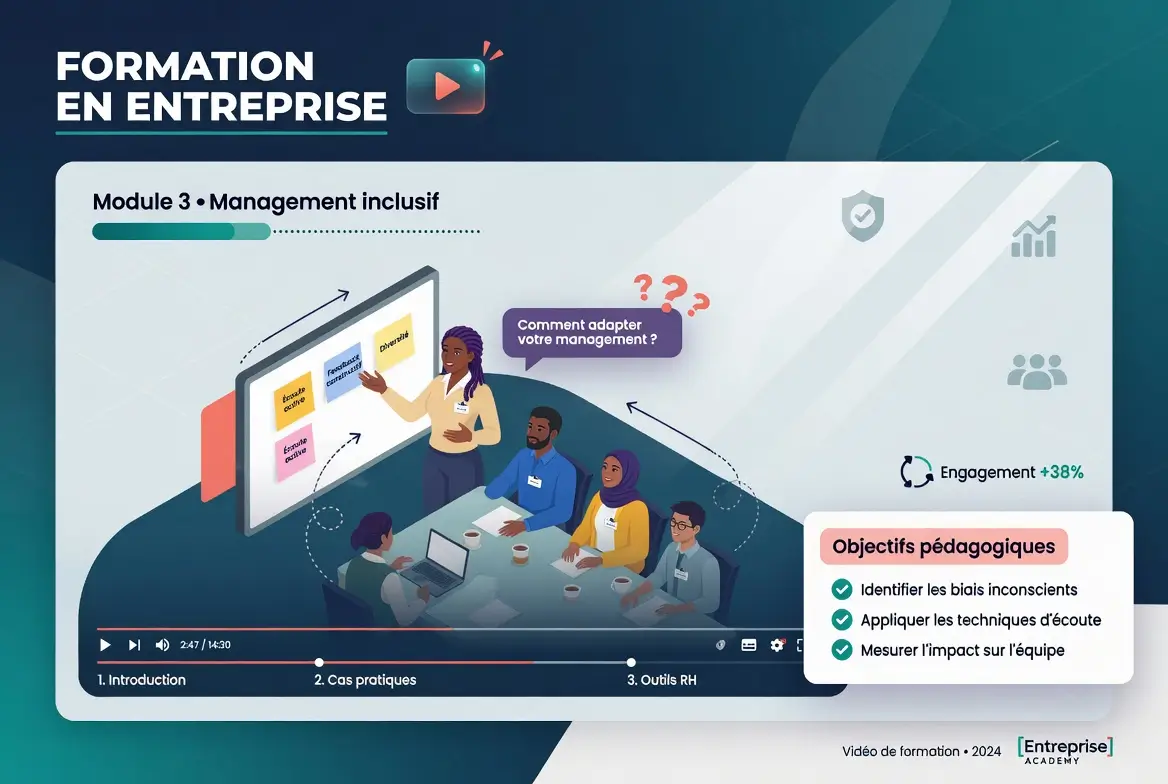
Corporate video training has become the central tool for transforming learning into an organization. It boosts knowledge retention by 65% compared to text alone, and reduces learning time by 40%. Kosmos, video agency in Bordeaux specialized in Social Ads and corporate video, creates video training modules that engage your employees and ensure the assimilation of key content.
Whether you need to train your sales teams on new products, to onboard new employees or to animate your managerial training courses, corporate video training offers a measurable ROI: faster adoption, reduction of the skills gap, and a significant reduction in the cost per person trained. Organizations that invest in video training see a 30% decrease in churn and a 22% increase in productivity in the following 6 months, as confirmed by studies by LinkedIn Learning on the effectiveness of video training.
This guide details the formats, tools, and production strategies for creating a corporate training video that captivates, engages, and transforms learning into concrete action within your organization.

Why video training is essential in 2026
Corporate training video meets three major challenges that only text or static e-learning cannot solve alone: engagement, retention and accessibility in a real work context.
The quantifiable benefits justify the investment in video training:
- 65% increase in retention : your collaborator remembers 65% of what they see on video compared to 5% in text alone. This explosive rise is explained by the simultaneous activation of visual, audio and narration.
- Reduction in learning time by 40% : a 5-minute video tutorial replaces textual documentation that you would have read in 15-20 minutes. Time saved multiplied by 100 employees = massive savings.
- 30% faster onboarding : new hires integrate processes and culture 30% faster when they benefit from dedicated videos rather than a static manual.
- Flexibility and unlimited revision : your collaborator watches the video 5 times if he needs to. No access limits, no mandatory interaction with a trainer, no time management.
- Mobile and asynchronous accessibility : 67% of employees prefer to learn on mobile. The training video can be consumed during transport, in the evening, during lunch break, without calendar synchronization.
- Traceability and measurement : in LMS (Learning Management System), you know exactly who watched, how long, at what pace, and you can include quizzes to measure effective comprehension.
These combined gains transform video training into a strategic investment, far beyond simple e-learning convenience.
The 5 key corporate training video formats
Each type of training content has its own structure, duration and optimal channel. Choosing the right format for your objective multiplied pedagogical effectiveness and reduced dropouts.
Tutorials and how-to's
Video tutorials are the most consumed in professional e-learning. They show how to complete a specific task in 2-5 minutes, in a linear and predictable manner. Ideal for training in tools (CRM, internal software, collaboration platform), processes (ticket creation, order validation, file closure) and procedural skills.
Tutorials work best with a screencast (screen recording), a clear voiceover, and legal text that overlays key points. The brain learns best when it can see, hear, and read together. The tutorials don't require a heavy production team or on-site filming: a screen, a microphone, and editing software are enough.
Motion design and animation explained
Motion design videos transform abstract or complex concepts into engaging visual stories. They are excellent for strategic training (corporate vision, values, global processes), product training (positioning, competitive advantages, revenue model) and soft-skills training (non-violent communication, leadership, feedback).
A 2-3 minute motion design video replaces 1-2 hours of current training. Well executed, it leaves a much deeper memory trail than a PowerPoint slide. For a more formal and structured approach, the corporate video offers an elegant alternative to motion design animations. Kosmos creates motion training videos that synthesize your message in 60-120 seconds of animation, with narrative voice-over and music adapted to your brand identity.
Interactive screencasts and micro-learning
Interactive screencasts combine screen recording with clicks, zooms, annotations, and quiz breaks. They allow the viewer to click to go further or to advance at the chosen pace. Perfect for training in complex software (SAP, Salesforce, decision systems) where a single demonstration is not enough.
Microlearning divides training into modules of up to 3-4 minutes, each dealing with a unique concept. Target a unique problem or skill. Employees in training consume micro-videos in 3-5 minutes as soon as they arrive at work, rather than accumulating a 2-hour training course of which only 20% will be retained.
Simulations and video case studies
Simulation videos (or serious video games) put your employees in a real situation through predefined scenarios. A sales simulation video shows a representative dealing with a customer objection and then offers several possible responses. The trainee employee chooses the right answer and discovers the consequences. Very effective for sales training, HR training, and customer service training.
Video case studies tell about a real situation, its challenges, and the solution put in place. Powerful format for training in managerial skills, risk studies, profitability analyses.
Interviews and testimonies of collaborators
Interviews with employees or internal leaders offer authenticity and credibility. Your sales manager explains the new business strategy in 5 minutes of recorded interview. Your best field agent shares negotiation tips. Your internal customers are testifying to their success with a new process. These videos humanize training and make it more identifiable for your employees, especially in distance learning.
Stages of producing a vocational training video
Producing a training video requires a disciplined and collaborative process. Each stage feeds the next and guarantees a final result aligned with your educational goals.

Define learning goals (SMART)
Before a single frame is being shot, answer: what should your learners be able to do after watching this video? This learning outcome must be specific, measurable, achievable, realistic and time-bound.
A bad goal: “Teach customer service.” A good objective: “Ability to deal with a customer complaint in less than 48 hours by following the 5 steps of the process, while using the 3 communication tools approved by the company, and by collecting a satisfaction rating greater than 4/5”.
- Primary objective : what the learner should remember and reproduce (knowledge, know-how, interpersonal skills).
- Estimated video length : for 1 simple objective, 2-4 minutes are enough. For 3-5 linked goals, 10-15 minutes max. Beyond that, split into several videos.
- Target audience : senior employees need context and nuances. Junior collaborators need clear step-by-step instructions and concrete examples.
- Viewing conditions : asynchronous on mobile, synchronous in groups, or integrated into an LMS? This guides the duration, the style, and the structure.
- Success measure : improving a quiz score, increasing the compliance rate, reducing processing time, or post-training satisfaction?
Create storyboard and script
Storyboarding is your visual shooting plan: every scene, shot, text, and image is pre-visualized. For simple training (screencast), a detailed script text is sufficient. For a motion design video, a storyboard illustrated with 10-20 vignettes is essential to avoid unpleasant surprises during editing.
The script should be precise, interspersed with visual breaks (2-3 second shots with no voice-over to breathe) and free of jargon that is inaccessible to your audience. Read the script out loud before production: this reveals the length and the awkward phrasing.
Producing assets: filming or screencast
Depending on your format, produce your raw elements. A software tutorial = HD screen recording, visible mouse, natural clicks, zoom on important areas. A video motion design = creation of graphic assets in an Adobe suite or with a specialized designer. An interview = studio shooting or rental, lighting, HF microphone, and 1-2 cameras for B-roll.
Production is the time that consumes the most time and resources. Good preparation (storyboarding, script, scouting) reduces retakes and speeds up delivery.
Assembly and calibration
Editing arranges clips, adds transitions, inserts graphics and subtitles, and synchronizes voiceover. Timing is crucial: a cut every 3 seconds maintains attention; a cut every 8-10 seconds causes disinterest. Courses for young audiences (under 30) tolerate faster rhythms; senior audiences appreciate a quieter pace but understand better with intentional breaks.
Color grading unifies aesthetics, especially if you have multiple footage sources. It reinforces perceived professionalism.
LMS integration and interactive quiz
If your course is integrated into the Learning Management System (Moodle, Docebo, Docebo, Cornerstone, 360Learning), you can add quizzes, polls, and break points after the video. These interactions improve retention by an additional 25% and give you data on real understanding. A post-video quiz of 3-5 questions is enough to assess comprehension and to stop rapid forgetting.
Video formats: training and comparison
Here is a decision matrix for choosing the right video training format according to your context:
Deployment strategies and measuring the ROI of video training
A perfect training video is not enough: it is still necessary to deploy it massively and measure its impact on learning and business activity.
LMS integration and communication
If you have an LMS (Moodle, Docebo, Cornerstone, Cornerstone, 360Learning, Upskill), integrate your video training into a structured course with prerequisites, evaluations, and certificates. Employees will follow more if training is mandatory and formal. Support the launch with an internal email explaining why and how, with a direct link and a deadline.
For organizations without LMS, create a shared Google Drive structured by theme, or a private YouTube playlist with restricted access to your collaborators.
Mobile-first and accessibility
Deliver the video in responsive format (16:9 and 9:16 aspect) with mandatory subtitles. 67% of your employees will consume the training video on mobile, in transport or at home. Without subtitles and without mobile adaptation, you lose the majority of your audience.
Measurement and feedback
Capture four key metrics for each training video: completion rate (% of employees who finish the video), post-training grade (1-5 stars), comprehension score (post-video quiz), and business impact (change in actual performance after 2-4 weeks).
Completion rates < 50% indicate too long duration or boring content. Comprehension scores < 60% indicate insufficient clarity. Business impact can be measured by KPIs: reduced processing time, increased compliance, customer satisfaction, error rate.
- Completion rate : target: at least 70%, ideally 85% +.
- Post-video satisfaction score : target: 4/5 or more. Fewer signals a problem with commitment or clarity.
- Comprehension score (quiz) : target: 75% +. Fewer signals an educational review of the content.
- Measured business impact : pre-video comparison and 4 weeks post-video comparison on a key KPI (processing time, error rate, customer satisfaction).

The tools to create your training video
Several technological approaches according to your budget and your internal expertise:
- Simple screencast : Camtasia (100/year), ScreenFlow (129 ounces), or OBS Studio (free). Enough for tutorials. Apprenticeship: 2-3 hours for a beginner.
- Motion Design : After Effects (90/month), Blender (free). Production time: 40-80 hours for 2-3 min. Requires an expert graphic designer. Alternative: call on a specialized agency.
- Complete video creation : DaVinci Resolve (free or 295 once), Adobe Premiere (55/month). To discover the best video editing software, see our detailed comparison. Good for general editing but the learning curve is steep for a novice.
- Interactive LMS : Articulate Storyline (299/year per user), iSpring Suite (150/month). Allow you to create quizzes, interactions, and track completion without having to code.
- Specialized video agency : Kosmos (and others) produce your training video from A to Z in 3-6 weeks, with educational expertise included. Total cost: 2000-€10,000, but guaranteed professional results and zero learning curve.
Common video training mistakes and how to get around them
Training videos that fail often share the same flaws. Here they are with their solutions:
- Too long : result = 40% of abandonment before the end. Solution: respect a maximum of 5-7 minutes for simple content, divide into several modules for complex content.
- No clear educational objective : result = diffuse content, no narrative thread. Solution: start the video with “at the end, you will know how...”, recall the objective halfway through the video.
- Soft or shy voiceover : result = perception of inexperience or doubt. Solution: professional voiceover, your expert and assertive, not hesitant.
- Screencast without zoom or without a pointer : result = does not know where to look. Solution: zoom in on active areas, visible pointer, annotations to highlight important elements.
- No subtitles : result = 68% of your users don't watch without sound. Solution: subtitles are mandatory in any case.
- No post-training measures : result = impossible to know if the apprenticeship has taken place. Solution: minimum quiz of 3-5 post-video questions, business impact measurement 4 weeks later.
FAQ: your questions about the corporate training video
How long does it take to create a vocational training video?
For a simple video (3-4 minute screencast tutorial), count 5-10 days of total work: 1-2 days of scenario and storyboarding, 2-3 days of capturing or creating assets, 2-3 days of editing. For motion design (2-3 minutes), add 30-50 hours of graphic design, or 2-3 additional weeks. A specialized agency can speed up the process to 10-20 days in total with optimized processes, but the timeline depends on complexity and your responsiveness in providing briefs and feedback.
What is the optimal format for the duration of a training video?
The ideal length depends on the content. For a unique concept or a simple procedural process, 2-4 minutes are enough. For several related concepts, 5-10 minutes maximum. After 10 minutes, the dropout rate reaches 60-70%. If your content requires more than 10 minutes, divide it into 2-3 videos of 4-5 minutes each, forming a series. Microlearning modules (3-4 min) generate the highest retention rates (82% vs 65% for long tutorials).
Should we integrate interactive elements into a training video?
Yes, but in moderation. A post-video quiz (3-5 questions) improves retention by 20-25%. Breaks or multiple intra-video choices (branch learning) increase engagement but complicate production and require an LMS or a specialized platform. For a first training video, a simple post-video quiz is enough. Add more complex interactions once you've mastered basic production.
What is the best platform to broadcast a training video?
Ideally, a dedicated LMS (Learning Management System) such as Docebo, Cornerstone or 360Learning that allows you to track completion, scores, and send reminders. If you don't have an LMS, a private YouTube playlist works, or a Google Drive shared with the embedded video. For high-value asynchronous e-learning, Vimeo Pro (75/month) offers advanced analytics. Avoid public YouTube for confidential internal training: choose private solutions.
How to integrate video training into your overall training plan?
Video training works best as a complement to a structured training plan, not as a replacement. Use video for the theoretical part or asynchronous reinforcement, then complete with synchronous face-to-face training (workshops, coaching) for feedback and exchange. Example: launch a 2-minute motion design training video on your new business value, then 2 weeks later, organize a 90-minute in-person workshop with discussions, Q/A and co-creation. The combined effect exceeds the sum of the two effects.
What budget should you plan for a turnkey corporate video training?
Average budgets with an agency: simple tutorial (screencast, 3-4 min) = 800-1500€. Explanatory motion design (2-3 min) = 2000-4500€. Complex interactive screencast (6-8 min) = 1500-3000€. Full package (3 training videos of 4-5 min each, with quiz) = 4000-8000 €. These budgets include brief, script, production, editing, subtitles. Ask for a detailed price list and references to previous productions before contracting.
Transform your internal training through video
Corporate training video multiplies the effectiveness of your talent development programs. It accelerates onboarding, standardizes critical learning, and leaves lasting traces that your employees can review at will.
Kosmos creates training videos that engage and convert learning into behavior change. From the educational scenario to the final multi-channel deliverables (LMS, YouTube, mobile), we take care of the complexity to offer you video modules ready to deploy.
Ready to modernize your internal training through video? Explore our Motion Design Services and our practical production guides to get started. Contact our Kosmos experts for an audit of your training needs and a personalized quote.